


Shaghaf Chat - شغف شات
3.65.00 Reviews
App Specs
- Version
- 1.4.1
- Updated On
- License
- Free
- Downloads
- 10,000+
- Developer
- shaghaf Chat
- Categories
- Communication
- Platform
- Android
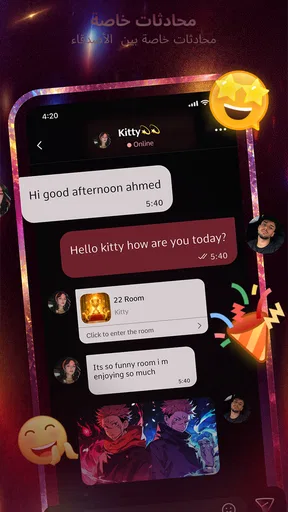
Screenshots




 Analysis by AppCompare
Voice chat apps can feel exciting on the first day because conversation starts faster than it does in a traditional messaging app. Shaghaf Chat, written as شغف شات in Arabic, is built around that immediate feeling: open a communication space, hear real people, and potentially make new friends without waiting for a long text exchange to develop. I found its appeal easy to understand, especially for anyone who prefers speaking to typing.
What matters more, though, is whether an app like this still deserves a place on your phone after the novelty wears off. My view is that Shaghaf Chat is most interesting as a casual voice-social app, not as a replacement for every communication tool. It can suit spontaneous conversations and social discovery, but its long-term usefulness depends heavily on whether you enjoy returning to the same kind of open-ended interaction.
From the first week to a lasting habit
I would judge a voice-social app by more than whether it starts a conversation quickly: the useful question is whether I can comfortably return to it as my routines and energy change. Here, I’d pay attention to which parts of a session feel easy to follow and which demand more focus, because that distinction helps show whether casual voice contact can become a sustainable habit.
Why the first sessions feel approachable
The basic idea is clear. Rather than centering the experience on carefully written messages, the app focuses on live voice conversation. That makes the first visit less demanding for people who find typing slow, formal, or tiring. I can imagine using it after work, during a quiet evening, or whenever I want a little social contact without preparing a message or arranging a full call with someone I already know.
That distinction is important. A normal messenger is usually organized around existing contacts, while this app is aimed more at meeting people and talking in the moment. A video-calling service is better when I need a planned conversation with a specific person. A text community is often better when I want to read quietly and answer later. Shaghaf Chat occupies the space between those options: more immediate than text, less personal and structured than a private call.
During a first week, that immediacy can be enough to keep the app feeling fresh. Voice creates a stronger sense of presence than a row of text bubbles, and it can make a short exchange feel more natural. Someone who is shy about starting a video call may also find voice-only interaction more comfortable. The lack of a camera can reduce pressure about appearance and surroundings, while still allowing tone and personality to come through.
I would especially consider it for people who are learning how to socialize in a new language, looking for casual conversation, or simply wanting to widen their circle beyond existing contacts. It is also a reasonable option for users who dislike the performative side of social networks. You do not need to create a polished public post to begin talking. The trade-off is that voice chat asks for attention immediately, so it is less suitable when I am in a noisy place or only have a few seconds to spare.
Worth Reading Before You Choose

Flipboard Shows What News Apps Must Do Beyond the Feed

Switching to Android Auto Means Rethinking Your Driving Routine

Google Calendar Makes a Crowded Week Easier to Manage

Ludo King Makes the Most of the Minutes Between Plans

Baby Panda World Brings Quick Play to Modern Phones, but Its Game Library Feels Busy

ESPN’s Live Game View Makes Following Close Games Easier
A realistic everyday use case
Imagine finishing dinner and having half an hour before bed. I might open the app, browse the available social activity, and join a conversation rather than scrolling through short videos. If the exchange is friendly, I can stay for a while; if it feels awkward, I can leave without turning the interaction into a long written thread. That low-commitment pattern is one of the strongest reasons to try it.
There is also a practical routine for getting more from that kind of session. I would use headphones, begin with a short visit, and avoid treating every conversation as the start of a close friendship. Voice chat works best when I approach it as a series of small social moments. Expecting every session to produce a meaningful connection would make the app feel disappointing very quickly.
Another useful habit is to decide what I want before opening it. If I want relaxed conversation, I can give the app time to provide that. If I need a private, reliable discussion with a family member or colleague, I would choose a conventional messenger instead. This simple distinction prevents the product from being judged for a job it was not designed to do.
What the current release tells me
The app is developed by shaghaf Chat and is available free of charge, which makes trying it relatively easy. Its current version is 1.4.1, and it supports devices running Android 7.0 or later. That broad operating-system reach is helpful for people using older Android phones, although the experience will still depend on the handset, microphone, headphones, and connection being used.
Its audience is marked Teen, so I would not treat it as a children’s communication space. Parents and younger users should take that label seriously and consider whether live conversations with unfamiliar people are appropriate. Voice interaction can feel friendly very quickly, but that does not automatically make every person or conversation trustworthy. I would avoid sharing personal contact details, location information, school details, or anything I would not want repeated outside the app.
The app has passed the early discovery stage with more than ten thousand installs, while its average rating sits at 3.6 from roughly two hundred ratings. I read that as a sign of a product with a real audience but a still uneven public reception. It is enough activity to make the concept worth testing, yet not enough to assume that every session will feel equally lively or polished.
Does it become more useful after the novelty fades?
The answer depends on the kind of value I want from communication software. If I need a dependable archive of messages, searchable conversations, file sharing, or a guaranteed way to reach known contacts, this is unlikely to become my main app. Traditional messengers win because they solve repeatable tasks with familiar contact lists and predictable notifications.
Shaghaf Chat has a different chance at becoming a habit. Its recurring value comes from spontaneous social contact. That can be meaningful for someone who lives alone, works remotely, has recently moved, or wants low-pressure conversation without exchanging phone numbers. The app does not need to replace a messenger to earn a place on the phone; it only needs to provide a type of social interaction that the other apps do not provide as comfortably.
Still, this value is naturally inconsistent. Some days I may find an engaging conversation quickly. On other days, the available activity may not match my mood, language, or preferred pace. That variability is not a minor detail; it is the central long-term trade-off. The app can feel more human than text, but it cannot offer the same predictability as messaging someone I already know.
Small details that improve the routine
My first practical tip would be to keep sessions short until I understand the rhythm of the community. A ten-minute visit tells me more about the quality of interaction than leaving the app open in the background. It also reduces the risk of spending an entire evening in conversations that are repetitive or uncomfortable.
Second, I would treat voice quality as part of the experience rather than an afterthought. A headset can make it easier to hear people and avoid forcing others to listen to room noise. If I am using mobile data, I would also pay attention to how often I open the app and whether live conversation fits my plan. The application is free, but the broader cost of regular voice use can include data, battery, and time.
Third, I would keep boundaries clear from the beginning. A friendly voice does not establish identity, and a quick conversation does not create an obligation to continue. If someone pressures me for private information, money, another contact channel, or a personal meeting, I would end the interaction. That is not a criticism unique to this product; it is an essential rule for any service based on meeting unfamiliar people live.
The maintenance burden of keeping it installed
Every social app asks for more maintenance than its icon suggests. I have to decide when to open it, manage the interruptions it may create, and judge whether the conversations are still worth my attention. With a voice-first service, the burden is more noticeable because I cannot casually skim everything while doing something else. Joining means listening, responding, and staying mentally present.
That can be a strength when I want genuine interaction, but it becomes friction when I am busy. The app is not ideal for a quick information check or a silent browsing session. It asks me to participate rather than passively consume. People who prefer asynchronous communication may install it, enjoy the idea, and then stop returning because their daily routine does not leave room for live conversation.
I would also review the app’s purchase prompts carefully. Although the download is free, in-app purchases range from $0.99 to $204.99 per item. That wide range makes it important to understand what is optional before spending anything. I would begin with the free experience, avoid buying simply to keep up with other users, and set a firm personal limit. A social app should not turn the desire for attention or friendship into pressure to pay.
For someone who wants a lightweight tool that stays out of the way, this may be a drawback. The product earns its place only when I use it intentionally. If I install it because the concept sounds interesting but cannot identify a regular moment when I would actually speak with people, it may become another unused icon.
Where fatigue begins
The biggest source of fatigue is repetition. Voice rooms and casual conversations can be enjoyable, but the format may start to feel similar from one visit to the next if I am not meeting people who share my interests. Unlike a focused community, the open-ended social model does not automatically give every conversation a topic or purpose.
Another issue is emotional inconsistency. A text message can be ignored until I have the energy to answer. A live voice exchange demands a decision now: speak, listen, or leave. That immediacy is the app’s main attraction, but it is also why it may not fit users who are anxious, tired, or looking for calm communication.
There is a difference between wanting friends and wanting constant availability, too. An app can make social contact easier without guaranteeing deeper relationships. I would use it as a doorway to conversation, not as proof that a friendship has formed. If I need long-term connection, I would move carefully and let trust develop outside the pressure of a live session.
Privacy and comfort deserve equal attention. I would avoid using the app in places where other people might accidentally be recorded or overheard, and I would not assume that a voice-only setting removes all social risk. The Teen content rating reinforces the need for sensible boundaries, especially for younger users. Anyone uncomfortable with open interaction among strangers should probably choose a private messaging service or a moderated interest-based community instead.
How it compares with familiar alternatives
Compared with WhatsApp-style messaging, Shaghaf Chat is more spontaneous but less dependable for known contacts. Messaging apps are better for sending a precise update, keeping a record, sharing a document, or returning to a conversation later. This app is better when the point is the live exchange itself and the possibility of meeting someone new.
Compared with video-chat platforms, it is less visually demanding. I do not need to worry about the camera, lighting, or what is behind me. That can make joining feel easier. The downside is that voice alone provides fewer visual cues, so misunderstandings may take longer to resolve and it can be harder to judge the atmosphere of a conversation.
Compared with large public social networks, the experience can feel more direct and less dependent on posting content. I am not waiting for a carefully edited profile or trying to attract reactions to a post. However, public networks usually offer more ways to filter interests, follow topics, and consume content at my own pace. If discovery without live participation is my priority, another category will serve me better.
Compared with dedicated language-exchange apps, this service may be more relaxed but less structured. A language platform usually gives me a clear learning purpose and a reason to return. Here, the value is broader social contact, so I would choose it for informal practice rather than a systematic study plan.
Who should keep it, and who should skip it
I would recommend trying it to a user who enjoys live conversation, wants to meet new people, and is comfortable with the unpredictability of social spaces. It is especially appealing if typing feels like a barrier or if video calls feel too formal. Someone who works from home or has limited opportunities for casual conversation may find the low-commitment voice format useful.
I would not make it my first recommendation for a person seeking private family communication, professional calls, organized learning, or a searchable record of discussions. I would also advise skipping it if live interaction with strangers creates more stress than enjoyment. Installing a voice-social app should feel like an invitation to talk, not another obligation to stay available.
For younger users, the Teen rating should guide the decision rather than being treated as a minor label. A parent may want to discuss privacy, personal boundaries, and spending before allowing regular use. The free entry point is convenient, but the presence of purchases means that account and payment habits deserve attention from the start.
My long-term verdict
After the first-week appeal fades, Shaghaf Chat has a clear but limited path to lasting value. It can remain useful when I deliberately reserve a little time for spontaneous voice conversation and accept that not every visit will be memorable. Its strength is not a long list of communication tools; it is the feeling of joining a live social moment without arranging a formal call.
That focus is also its main limitation. The app will not replace a dependable messenger, a private calling tool, or a structured community for every user. Its moderate average rating and still-growing audience suggest that I should approach it with realistic expectations rather than assume a consistently rich experience. I would test the free version first, use headphones, protect personal information, and watch whether I return naturally after the initial curiosity.
In my view, Shaghaf Chat earns a permanent place only for people who genuinely enjoy casual voice discovery. If I found myself opening it because I wanted a real conversation rather than because I felt obligated to maintain another social feed, I would keep it. If sessions became repetitive, expensive, or emotionally tiring, I would remove it without hesitation. That makes it a worthwhile app to try, but not an automatic long-term essential.
Pros
- Arabic-first interface makes chatting comfortable for local users.
- Simple design helps new users start conversations quickly.
- Supports meeting people with shared interests and backgrounds.
- Lightweight experience works well on many Android devices.
- Useful for casual social interaction without complex setup.
Cons
- User activity may vary significantly by location and time.
- Public chat spaces can include unwanted messages or behavior.
- Privacy settings should be checked carefully before sharing details.
- Some features may depend on account registration or permissions.
- The experience may feel limited for users seeking advanced chat tools.
FAQs for Shaghaf Chat - شغف شات
What is Shaghaf Chat - شغف شات, and what can I use it for?
Shaghaf Chat - شغف شات is a social communication app designed for meeting and chatting with other users, primarily within an Arabic-speaking community. After exploring the app, users can generally expect features focused on text conversations, discovering profiles or rooms, and social interaction. The exact options may vary by version, region, and account status, so checking the current store description is recommended before downloading.
Is Shaghaf Chat - شغف شات free to download and use?
The application may be available as a free download, but free access does not necessarily mean that every feature is unlimited. Social chat apps commonly include optional purchases, premium memberships, virtual gifts, or other paid services. Before creating an account or making a payment, review the in-app pricing, subscription terms, renewal conditions, and refund policy shown in the Google Play Store or Apple App Store.
Do I need to create an account to use Shaghaf Chat?
An account may be required for the main communication features, especially when sending messages, creating a profile, joining conversations, or interacting with other members. Registration can involve information such as a phone number, email address, username, age, or profile photo, depending on the current version. Use accurate information where necessary, and avoid sharing sensitive personal details publicly with strangers.
Is Shaghaf Chat safe for teenagers and general users?
Users should treat Shaghaf Chat like any public social platform and communicate carefully. The presence of chat rooms or direct messaging means that content and behavior can vary between users. Parents should check the app’s age rating, privacy settings, and supervision options before allowing teenagers to use it. Never share passwords, financial information, home addresses, verification codes, or private photographs with unknown contacts.
What should I check before downloading Shaghaf Chat - شغف شات?
Before installing the app, check whether it is compatible with your Android or iOS device, how much storage it requires, and which permissions it requests. It is also useful to read recent user reviews, confirm the developer name, and inspect the privacy policy. Because chat applications can change features and moderation practices through updates, downloading from the official app store is the safest option.


